Jollen 的 Android 教學,#2: “Hello Moko” - Activity 與 View 的關係
上一則文章介紹了 Activity 與 View 的觀念,若能再理解 Activity 與 View 的關係,就不難了解 Android 應用程式的整個模式了。請看以下的範例程式:
package com.moko.hello;

import android.app.Activity;
import android.os.Bundle;
import android.widget.TextView;

public class HelloMoko extends Activity {
   /** Called when the activity is first created. */
   @Override
   public void onCreate(Bundle savedInstanceState) {
       super.onCreate(savedInstanceState);

       TextView tv = new TextView(this);
       tv.setText("Hello Moko");
       setContentView(tv);
   }
}
這是在 Android SDK 文件裡的一段範例程式,類別 HelloAndroid 繼自 Activity。下圖是Activity的生命週期(lifecycle)。在「Jollen 的 Android 教學,#1」裡提到 Activity 負責建立視窗,根據 Activity lifecycle,當視窗建立時,onCreate 事件被觸發,所以我們在 onCreate 裡建立 View。
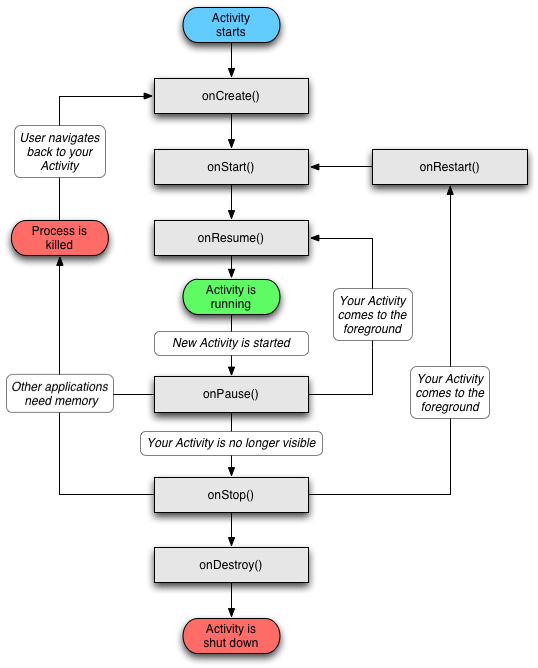
TextView 是 Android 的其中一個 View,故名思義,這是一個顯示文字的 View。最後,呼叫 Activity 的 method 'setContentView' 來將 UI 顯示於視窗上。

Jollen's Blog 使用 Github issues 與讀者交流討論。請點擊上方的文章專屬 issue,或 open a new issue
您可透過電子郵件 jollen@jollen.org,或是 Linkedin 與我連絡。更歡迎使用微信,請搜尋 WeChat ID:jollentw